Form Control - Work in Progress
/
Awesome Services /
Form Control - Work in Progress
By Pratik Takle. Posted on
Form Control Service:
- Here all form control service modules will be listed.
- They are defined with details and usage parameters.
- Please look for screenshots for more specific use.
_____________________________________________
Form control – select
| Title |
: |
form_control.select |
| Purpose |
: |
to get dropdrop with mentioned options |
| Syntax |
: |
1 2 3 4 5 6 7 8 9 10 11 12 13 14 15 16 17 18 19 20 21 22 |
[form_control.select label="label for dropdown" taxonomy="taxnomy slug" OR query="formatted query" OR posttype="post type" OR user-role="user role slug" OR predefined_values="array" required="yes/no" field="ID" id="name and id" multiple="yes/no" class="extra classes" placeholder="placeholder for dropdown" value="any prefilled value" /] |
|
| Input Parameters |
: |
(optional) label=”label for dropdown”
(required) field=”ID”
(required) id=”name and id”
taxonomy=”taxnomy slug”
OR query=”formatted query”
OR posttype=”post type”
OR user-role=”user role slug”
OR predefined_values=”array”
(optional) required=”yes/no”
(optional) multiple=”yes/no” – if you want to select multiple options
(optional) class=”extra classes”
(optional) placeholder=”placeholder for dropdown”
(optional) selectAll=”true/ ” – if you want select all option
(optional) value=” ” – if you want show any prefilled value from option |
| Return Value |
: |
service will return select dropdown with applied values |
| Example 1 |
: |
| Code |
: |
1 2 3 4 5 6 7 8 9 10 11 12 13 14 15 16 17 |
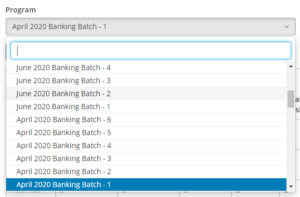
//** this is a specific exapmple, please change your values accordingly** // [template.set prog_query empty="{module.current_user_centre}"] select post_title as name,ID as value from `wp_posts` where post_type="classroom" and post_status="publish" order by post_date desc [/template.set] [form_control.select label="Select Program" query="{template.prog_query}" required="yes" field="ID" id="program_id" /] |
|
| Output |
: |
 |
| Description |
: |
in code, query is pass in select service which bring back all published posts from classroom post type in descending order of post date |
|
| Example 2 |
: |
| Code |
: |
|
|
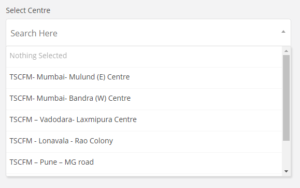
//** this is a specific exapmple, please change your values accordingly** // [form_control.select label="Select Centre" posttype="locate_us" field="ID" id="centre_name" /] |
|
| Output |
: |
 |
| Description |
: |
in code post type is passed as argument to select service which will bring back all published posts from locate_us post type. |
|
________________________________________________
Form control – text
| Title |
: |
form_control.text |
| Purpose |
: |
to get text box with mentioned options |
| Syntax |
: |
|
|
[form_control.text label="label for text box" addon_text="any warning or note" required="yes/no" field="ID" id="name and id" class="extra classes" placeholder="placeholder for dropdown" value="any prefilled value" readonly="yes or no" prepend_inline_icon="icon at start {icon name from font awesome lib}" append_inline_icon="icon at the end {icon name from font awesome lib}" attr_string="any extra parameters" /] |
|
| Input Parameters |
: |
(optional) label=”label for textbox”
(optional) addon_text=”any warning or note”
(required) field=”ID”
(required) id=”name and id”
(optional) required=”yes/no”
(optional) readonly =”yes/no”
(optional) class=”extra classes”
(optional) placeholder=”placeholder for textbox”
(optional) value= if you want show any prefilled value |
| Return Value |
: |
service will return textbox with applied values |
| Example 1 |
: |
| Code |
: |
|
|
//** this is a specific exapmple, please change your values accordingly** // [form_control.text label="Program Title" id="post_title" value="{module.post.post_title}" required="yes" placeholder="Add program name here..."/] |
|
| Output |
: |
 |
| Description |
: |
in short code, text service is called which is required, value is given as module.post.post_title and custom placeholder |
|
________________________________________________
Form control – date
| Title |
: |
form_control.date |
| Purpose |
: |
to get date calender with mentioned options |
| Syntax |
: |
|
|
[form_control.date label="label for text box" formate="d-m-Y" required="yes/no" field="ID" id="name and id" class="extra classes" placeholder="placeholder for dropdown" value="any prefilled value" attr_string="any extra parameters" /] |
|
| Input Parameters |
: |
(optional) label=”label for calendar”
(optional) formate=”required date format”
(required) field=”ID”
(required) id=”name and id”
(optional) required=”yes/no”
(optional) class=”extra classes”
(optional) placeholder=”placeholder for drodown”
(optional) value= if you want show any prefilled value
(optional) attr_string= if you want any extra parameters |
| Return Value |
: |
service will return date calendar |
| Example 1 |
: |
| Code |
: |
|
|
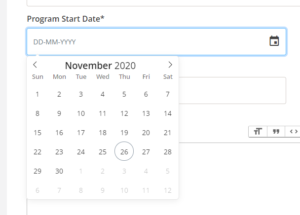
//** this is a specific exapmple, please change your values accordingly** // [form_control.date label="Program Start Date" formate='d-m-Y' id="program_start_date" value="{{aw2.get module.post.meta.program_start_date date_format='Y-m-d' }}" required="yes" /] |
|
| Output |
: |
 |
|
|
|
|
__________________________________________________
Form control – trix_editor
| Title |
: |
form_control.trix_editor |
| Purpose |
: |
to textarea with text and file manipulation options |
| Syntax |
: |
|
|
[form_control.date label="label for textarea" field="ID" id="name and id" control_class="parent div class (usually from grid)" class="extra classes" height="in px" form_type = "horizontal / default" placeholder="placeholder for textarea" value="any prefilled value" /] |
|
| Input Parameters |
: |
(optional) label=”label for calendar”
(required) field=”ID”
(required) id=”name and id”
(optional) required=”yes/no”
(optional) class=”extra classes”
(optional) form_type =”to seprate out textarea from label in divisions”
(optional) control_class==”parent div class (usually from grid)”
(optional) placeholder=”placeholder for textarea”
(optional) value= if you want show any prefilled value |
| Return Value |
: |
service will return textarea with editor options |
| Example 1 |
: |
| Code |
: |
|
|
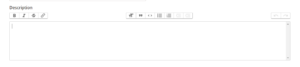
//** this is a specific exapmple, please change your values accordingly** // [form_control.trix_editor label="Description" form_type="horizontal" control_class="col-md-12" height="150px" value="{module.post.post_content}" id="description" /] |
|
| Output |
: |
 |
|
|
|
|
___________________________________________________
Form control – number
| Title |
: |
form_control.number |
| Purpose |
: |
to get textbox with number input |
| Syntax |
: |
|
|
[form_control.text label="label for text box" addon_text="any warning or note" required="yes/no" field="ID" id="name and id" class="extra classes" placeholder="placeholder for dropdown" value="any prefilled value" readonly="yes or no" prepend_inline_icon="icon at start {icon name from font awesome lib}" append_inline_icon="icon at the end {icon name from font awesome lib}" attr_string="any extra parameters" min="minimun value for number val" max="maximun value for number val" /] |
|
| Input Parameters |
: |
(optional) label=”label for textbox”
(optional) addon_text=”any warning or note”
(required) field=”ID”
(required) id=”name and id”
(optional) required=”yes/no”
(optional) readonly =”yes/no”
(optional) class=”extra classes”
(optional) placeholder=”placeholder for textbox”
(optional) value= if you want show any prefilled value
(optional) min=”minimun value for number val”
(optional) max=”maximun value for number val” |
| Return Value |
: |
service will return number input with applied values |
| Example 1 |
: |
| Code |
: |
|
|
//** this is a specific exapmple, please change your values accordingly** // [form_control.number label="Rate the Leaner" id="rating" required="yes" placeholder="Add Rating" min="1" max="10" /] |
|
| Output |
: |
 |
| Description |
: |
this will return number input with min=”1″ and max=”10″, placeholder as “add rating” |
|
Last Modified By Pratik Takle.